Earl Warren, American jurist and politician, once said, “It is the spirit and not the form of law that keeps justice alive.” This is even more pertinent when legislation is enacted to protect the rights of individuals and groups.
In many countries, laws are in place to ensure that citizens with disabilities are not discriminated against, be it in employment, business or any other area. Likewise, accessibility guidelines have been developed to ensure that products such as websites, mobile devices and applications can be used by people with various types of disabilities.
Disabilities can be visual (affecting sight), aural (affecting hearing), motor-related (affecting movement) or cognitive (affecting the ability to perform mental tasks). Companies and organizations have a legal obligation to cater to all types of disabilities when providing goods and services to the public.
However, fear of litigation leads many companies to focus so much on adhering to a guideline that they miss the spirit in which the law was passed. When a company becomes desensitized to the needs of its customers, the goal of accessibility is reduced to the mindless ticking of a few boxes. In turn, the company develops a checklist mentality of just following standards, yet lacks real insight into the needs of its users.
In this article, I’ll outline some of the dangers of habitually following standards without giving due consideration to the needs of customers with special needs. I’ll also provide some practical steps to ensure that your product is truly accessible by taking into account the needs of users with disabilities.
Is Following Standards A Bad Thing?
Accessibility standards such as the “Web Content Accessibility Guidelines” (WCAG) and Section 508 are vital to ensuring that websites are accessible. In fact, many of the standards are enshrined in legislation, such as the Equalities Act in UK and the Rehabilitation Act in the US.
Principles of user-centered design encourage products to be built with the target audience in mind, and this should be no different when it comes to accessibility. If standards are being followed without any understanding of the target audience, then companies and organizations will develop tunnel vision and comply simply because they have to, not necessarily because they want to.
As Long As We Comply, Does It Really Matter?
There is a fine line between complying and complying with awareness. Adhering to standards requires some understanding and appreciation of the end user. While complying with standards is permissible, doing so with an awareness of your target audience is better.
Following standards without any understanding or appreciation of customers with disabilities could have some or all of the following consequences:
- The website or product does not completely meet the needs of users with disabilities.
Accessibility standards provide guidance on how to make websites accessible. They do not cover all eventualities. - The company loses sight of the importance of accessibility.
The very reason why a company complies gets lost, and complying to a standard becomes the objective itself, rather than a means to an objective. I have witnessed many organizations be more eager to gain a mark of compliance than to understand their customers. - It creates a minimalist mentality.
Teams often ask, “What is the bare minimum we can get away with?,” rather than “How do we ensure that the user’s journey is efficient and pleasant, and remains so?” - The company views it as a burden, rather than an opportunity.
Accessibility is often viewed as a burden, rather than a way to increase customer loyalty and, in turn, increase sales (see the “Business Benefits” section below). - Users needs come to be regarded as homogenous.
Customer requirements are not understood properly. Users with disabilities are bulked together in one category and are dealt with as a homogenous group. However, as we know, people have many types of disabilities, and ensuring that everyone’s individual needs are met is important.
The consequences listed above arise either from not understanding the standards or from applying the standards in isolation. Putting an accessibility strategy in place is, therefore, important — a strategy whose key elements (as outlined in the following section) support accessibility standards.
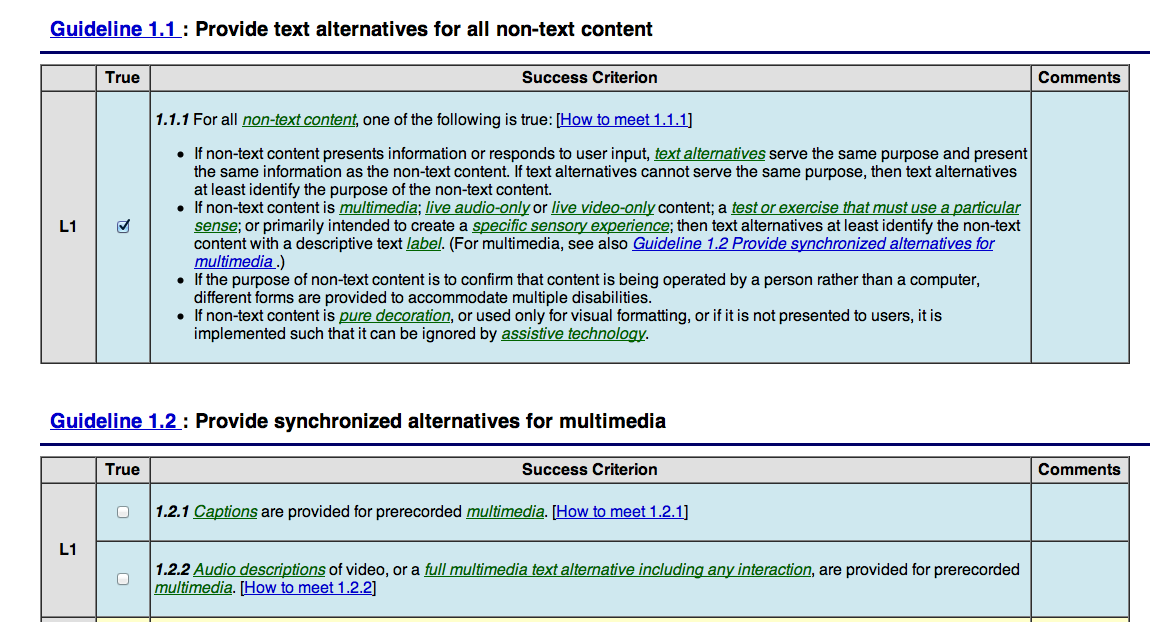
How To Avoid The “Checkbox” Mentality?
Below are some steps to take to ensure a thorough implementation of accessibility standards.
1. Understand Who Your End Users Are
Look at your demographics to understand the types of disability your audience has and how this will affect the accessibility of your website.
Users with various types of impairments will be using your website, but the website might not need to be optimized for all types of disabilities. This will greatly depend on the content. For example, if the website is rich in multimedia, such as video, then consider users with hearing impairments. A website with no audio or video, on the other hand, would not need to be optimized for users with those disabilities.
In depth user research can yield insight into your demographics. This can be done both by quantitative analysis of data and by qualitative observation.
Quantitative methods, such as user surveys, questionnaires and market research, can be used to find out who your users are. Qualitative methods, such as focus groups, ethnographic research and user testing (see below), are effective for gaining insight into how users with disabilities interact with a product and into their emotions, motivations and limitations.
If a company spends time to understand how customers with disabilities interact with its website, then it will be able to cater to their needs appropriately.
2. Incorporate Users With Disabilities Into Your Personas
Including users with disabilities in your set of personas will ensure that their needs are catered to early on in the project, and it will help to focus the team.
As mentioned, if the website does not have any audio, then personas with auditory disabilities would not need to be included. Once you have defined the personas, then you can review the tasks with these different personas to ensure that users can accomplish them with minimal impediments.
Personas are very effective at communicating the needs of users with disabilities to the team. I find that development teams grasp personas particularly well. It lends purpose and focus, and keeps the teams from developing systems that are blind to users and their needs.
Below is an example of a persona with a visual impairment. Please note that this is merely an illustration; personas will be based on your particular website and will be influenced by the data gathered from your user research.
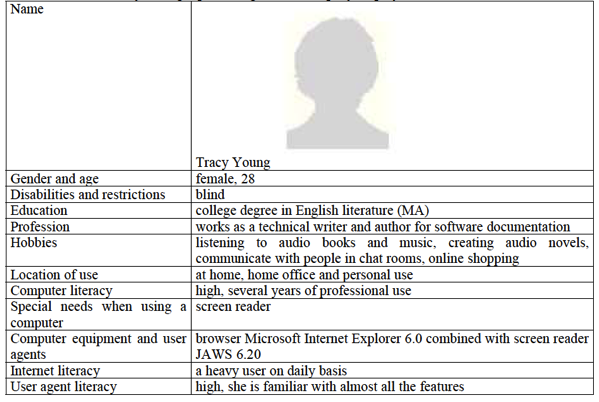
Example of a persona, courtesy of Werner Schweibenz (PDF).
3. Understand Accessibility Standards
Each point in the accessibility standards addresses one or more types of disability, whether they be visual, aural, cognitive or motor-related.
One way to understand accessibility standards is to ask how a particular requirement facilitates access to your website for users with impairments.
For example, checklist 1.4.1 of WCAG 2.0 states that “colour is not used as the sole method of conveying content or distinguishing visual elements.” While one could see this as just another requirement to implement, understanding how this affects users with disabilities is important. Users with visual impairments, such as colour blindness and partial sight, are affected because they are unable to distinguish between colours.
Colour blindness affects about 5 to 8% of males (approximately 10.5 million people) in the US and less than 1% of females. People with colour blindness can be divided into two main categories, as explained by Jeanne Liu: those who have difficulty distinguishing between red and green, and those who have difficulty distinguishing between blue and yellow.
Understanding how users are affected by colour will help you implement appropriate design solutions. For example, this requirement could affect how you handle form validation. Many online forms display messages related to validation and required fields in red, to indicate importance; however, this could contravene accessibility guidelines. One way to ensure that such messages have the same impact on users with visual impairments is to display a relevant graphic next to the message. (Learn more in the W3C’s document “Use of Colour Understanding SC 1.4.1.”)
By understanding each checklist item and how it applies to your users, you will have a greater appreciation of the diverse needs of your users.
4. Understand How Users Interact With The Website
Many users with disabilities are unable to use websites directly, requiring third-party technology to perform tasks. Organizations need to understand how users interact using assistive technologies such as screen readers, screen magnifiers and head wands.
You can do this by observing users with disabilities as they work or as they perform set tasks in a usability lab.
Carry out usability tests on site; users feel comfortable in their own environment. Also, allow them to use their own assistive technology, because they are already familiar with it.
In this way, you will gain a true picture of how users interact with your website, which will enable you to optimize the website to support these technologies.

5. Perform an Accessibility Audit
An accessibility audit can reveal most accessibility issues. However, a person or organization with a deep understanding of accessibility should conduct the audit.
Many companies misunderstand or misinterpret results when performing an audit themselves by overly relying on automated tools such as WAVE, Total Validator, Accessibility Valet and Accessibility Checker, to name but a few.
I’ve carried out many accessibility audits over the years for both corporate and government clients. I’ve seen first hand the problems that arise when companies use automated tools to evaluate their own websites.
The automated tools are not always accurate and can often provide misleading information. For example, some tools evaluate images with null alt attributes as a failure. However, images that are aesthetic in nature do not require a descriptive alt attribute.
Users with visual impairments use screen readers to listen to content on a website. Screen readers use alt attributes to describe images on a website. While all images should have an alt attribute, not all images require a descriptive attribute.
Images that are purely decorative (i.e. that provide no functional purpose) warrant a null attribute, so that screen readers skip over these images. Giving aesthetic images descriptive alt attributes would actually be a problem in itself, because users would be required to listen to superfluous information.
There are many instances like this, which makes it paramount that websites be evaluated by those who understand accessibility.
6. Test With Users
Carrying out tests with users with disabilities provides real-life scenarios of how your website will be used by the end users. This is critical to the team and the company as a whole gaining context and focus.
When I worked on a digital project for a well-known government agency, the client requested some accessibility testing on its website. The way that users with disabilities were using the website was a real eye-opener for the client and our team alike.
The testing was carried out with a select number of users with various types of disabilities. Each user was asked to perform the same tasks using their respective assistive technology. As they performed the task, they were encouraged to talk about their experience.
The tests created deep understanding of how the website was being used with assistive technologies. It became a focal point of discussions for months within the team, particularly for developers, who were able to observe how users with disabilities interacted with the website they had built.
Business Benefits
Accessibility should be seen as an opportunity to increase market share and customer reach. Over 11 million disabled people live in the UK (20% of population), with an estimated spending power of £50 to £80 billion a year, according to the Department for Work and Pensions.
Companies such as Tesco and Legal & General testify that an accessible website has not only increased their revenue and sales, but also made the user journey more efficient for all users.
I often wonder how accessibility can be seen as a burden when it brings so many benefits. Rather than embracing the opportunity, some view accessibility with the same burden as filling out a tax form.
Companies should realize that the benefits of making a product easy to use far outweigh the costs. Ensuring that a website is accessible not only makes it friendly to users with disabilities, but increases usability for all people. Markets are there to be seduced, not patronised, and once this point is embraced then customer acquisition levels will undoubtedly increase.
It’s All About The User Experience
Users have different requirements and abilities when interacting with a website. Companies already spend time and effort to understand those needs in order to improve interactions.
This should be no different when looking at the needs of people with disabilities. These users represent a large proportion of the consumer market, so understanding their needs as well is critical.
Accessibility standards exist to help companies. But while they are a good starting point, companies should not blindly rely on standards without appreciating the circumstances of their customers. By understanding users and their needs, organizations will ensure not only that they meet the legal requirements, but that they uphold the spirit of the standards.
Further Reading
- “Beyond Accessibility: Treating Users With Disabilities as People,” Jakob Nielsen, Alertbox
- “Accessibility: Why and How to Include People With Disabilities” (PDF), Werner Schweibenz
- “The Web: Access and Inclusion for Disabled people” (PDF), Disability Rights Commission
- “User Observation/Field Studies,” Usability Net
(al)
 Nural Ali